TLDR#
One size fits all solutions for key management restrict adoption and scalability. Trade-offs in control, risk tolerance, and operational costs need to be balanced based on the value and type of assets being secured, the entities involved in managing assets flows and regulatory requirements. Vulcan Forge provides multiple secure and flexible key management models.Blockchain accounts onboarded into the Vulcan Forge platform fall into these categories:Managed: Accounts (public/private key pairs) that can be used by the system to sign transactions with
Unmanaged: Accounts that can be referenced by blockchain transactions but cannot be used for generating signatures.
generated by Vulcan Forge
onboarded into the system by providing them at creation time - see the privateKeyDetails under the New Account schema. Private Keys Storage#
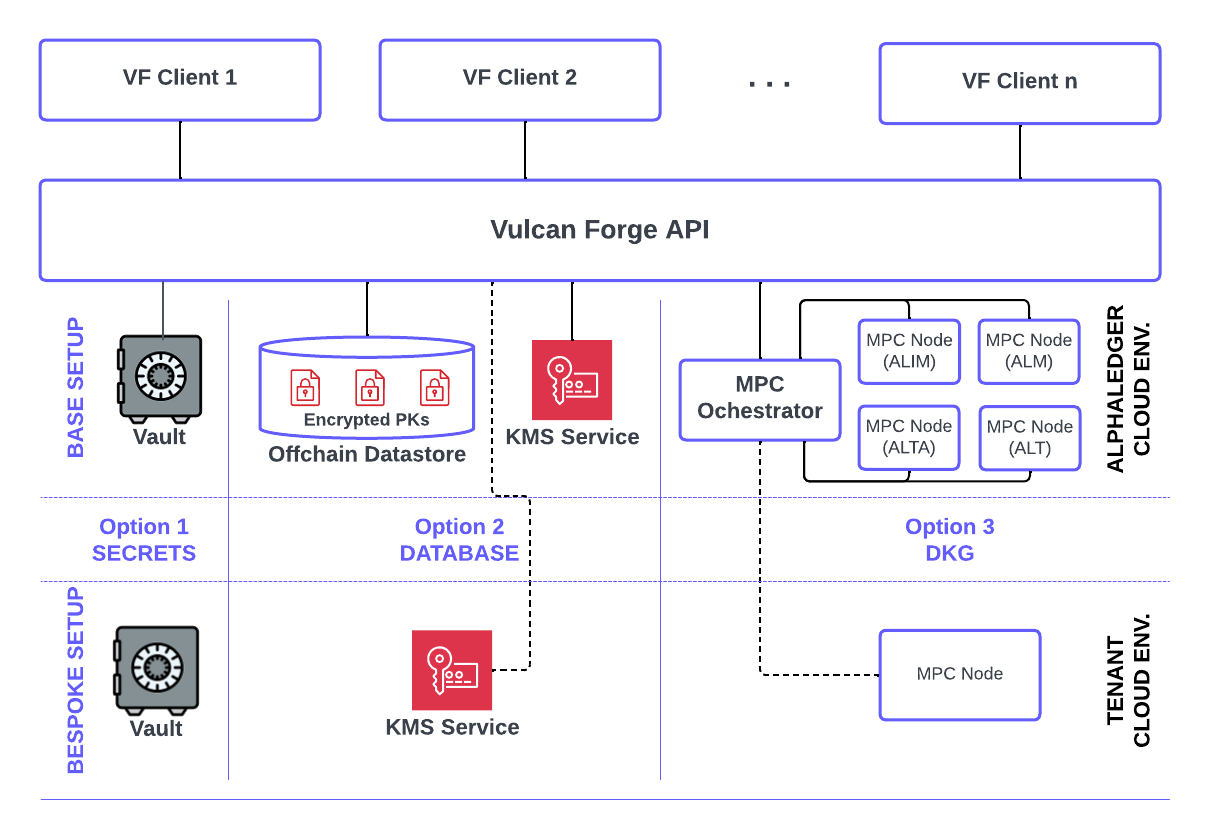
There are 3 storage locations that a Vulcan Forge client can choose from, to have the private key of a managed account stored.The paragraphs before each of the Bespoke Setup sections describe the Base Setup provided by default by Vulcan Forge.1. Cloud-based Secret Vaults#
These secret vaults are securely managed and controlled in terms of internal read and write access to them, using least privelege access principles. Private keys are deployed and stored into these encrypted secret vaults.Vulcan Forge writes the private keys to these vaults at account onboarding time and reads them from the same location when it needs them to generate signatures.Bespoke setup: Tenant managed Key Vaults#
Optionally, the location of these secrets vaults can be setup as a bespoke solution and hosted by the Vulcan Forge tenant:The enterprise tenant can choose to host the secret vault and provide (using cross-account resource access) the Vulcan Forge system read/write access to these secrets, from the customer's managed secret vault.
In this setup, the private key is never stored on Alphaledger managed systems, and Vulcan Forge just writes (at account create time) and reads the private key from the customer managed vault when signatures need to be generated.2. Encyrpted Database Storage#
Private keys are encrypted (256-bit, AES-GCM) with cloud based KMS services and stored in their encrypted form in the offchain database. The entire database is also encrypted at rest and only accessible via Alphaledger's internal network. Internal access to this KMS service is also strictly controlled with least privilege access principles.Vulcan Forge encrypts the private key at the time the public key pair is generated or onboarded and decrypts it on the fly with the cloud KMS service, when a signature needs to be generated. At no time, will the private key be stored at rest in clear text.Bespoke setup: Tenant managed KMS Service#
Optionally, the tenant can use its own cloud-based KMS service to perform encryption/decryption operations. In this bespoke solution:The enterprise tenant manages the KMS service in its own cloud account and (using cross-account resource access) provides the Vulcan Forge system permission to perform ecnryption/decryption operations with it.
In this setup, Alphaledger never uses its own encryption/decryption service to work with the private key stored in encrypted form, in the Vulcan Forge offchain database. The tenant has full access priveleges and usage audit over the KMS service it manages.3. Dynamically Generated Keys (DKG)#
Alphaledger runs a cluster of MPC nodes using Blockdaemon's Builder Vault. Each node is mapped to one of the Alphledger entities and a combination of these nodes can be used for dynamic key generation with m-out-n keyshares. These keyshares can then be used in TSS (Threshold Signature Services) setups to perform muli-parties signatures of transaction messages.With this setup, the key is stored nowhere (encrypted or uncrypted) in its entire form - instead it is split across multiple keyshares, each hosted (in an encrypted form) by one of the nodes in the MPC cluster. When it comes time for signing, each of the keyshares provides its partial-signature until the minium number of required parties is met to generate a full signature.Alphaledger has built an MPC orchestration service that coordinates the keys setup and signing activities across the entire MPC nodes cluster. This service comprehensively records (in its own data store) the configurations for all MPC nodes, keys and keyshares and all performed signing activities.The Vulcan Forge system uses this MPC orchestration service as a gateway to the MPC nodes when setting up DKG keys and performing MPC signing activities.Important Note: the current DKG setup does not allow for either the import/onboarding of an external private key or the export of a private key already generated in the system. We are considering allowing the ability to export the private key for emergency reasons.Bespoke setup: Tenant managed MPC Node#
More MPC nodes can be added to the Alphaledger MPC cluster and coordinated through its MPC orchestration service.The enterprise tenant manages the Builder Vault MPC Node and can apply additional validations/enforce policy rules of its own, before using its keyshares to provide partial signatures on signing requests originated from Vulcan Forge and brokered through the MPC orchestration service.
The nodes in the MPC cluster have the following labels:alt -> Alphaledger Technologies
alim -> Alphaledger Investment Management
alm -> Alphaledger Markets
alta -> Alphaledger Transfer AgentThese codes apply to the useBackendPlayerCodes field in the DKG Key Setup schema used as part of the creation of a new account (privateKeyDetails). Any permutation of these codes - with a minimum of 2 nodes and max of 4 - can be used for setting up a DKG Key. Note that the selection of either of these nodes in the Key setup implies no specific guarantees resulting from licenses held by either of these Alphaledger entities. These codes are currently simply just that: labels to help us and VF clients identify each of these 4 nodes.Bespoke Configurations#
While many of the Vulcan Forge tenants will likely not need additional setups on top of the Base Setup, we are congnizant of the wide array of security requirements for key management that modern and large enterprise have.As such, we can configure and support the bespoke solutions - they will require extra intial setup and ongoing management.If interested in either of the bespoke configurations, mention it at the time you request onboarding to Vulcan Forge.Private Key Access#
The only way to get access to a private key is through a an endpoint dedicated solely for this purpose.An API Key that is associated with the special role of (VULCAN_FORGE_SENSITIVE_DATA_ACCESS) is required to fetch the private key.As mentioned above, a public/private key (i.e. blockchain account) setup with a privateKeyDetails.locationType of DKG cannot currently be exported.Considerations for Regulated Assets#
Most financial instruments setup for regulated assets will likely have the Permanent Delegate extension turned on. This grants powerful capabilities to the token issuer that has access to the private keys for this authority.As such, the storage of the private key for such for a permanent delegate authority, will be governed by the most stringent security requirements.At the same time, private keys for wallets designed to only hold these type of assets (i.e. assets that have a permanent delegate attached to them), may have more permissive rules: in the event of a security breach and unauthorized access to these kind of wallets' private keys, consequences are lighter and repairs easier to deal with. A new wallet can be created to replace the compromised one and the permanent delegate authority can be used to update/move token balances to make the wallet owner whole.Modified at 2026-02-22 21:33:55